이 페이지는 한국어로도 볼 수 있어요 →

Early access · everything is free for now

A fresh page
every day.

Rollov is the private daily planner where nothing falls through the cracks. At midnight it turns the page: what you finished stays behind, what you didn't rolls over, and yesterday is kept exactly as you left it.

No card needed · Web and Android · Works offline

One page per day

Open it and you see today.

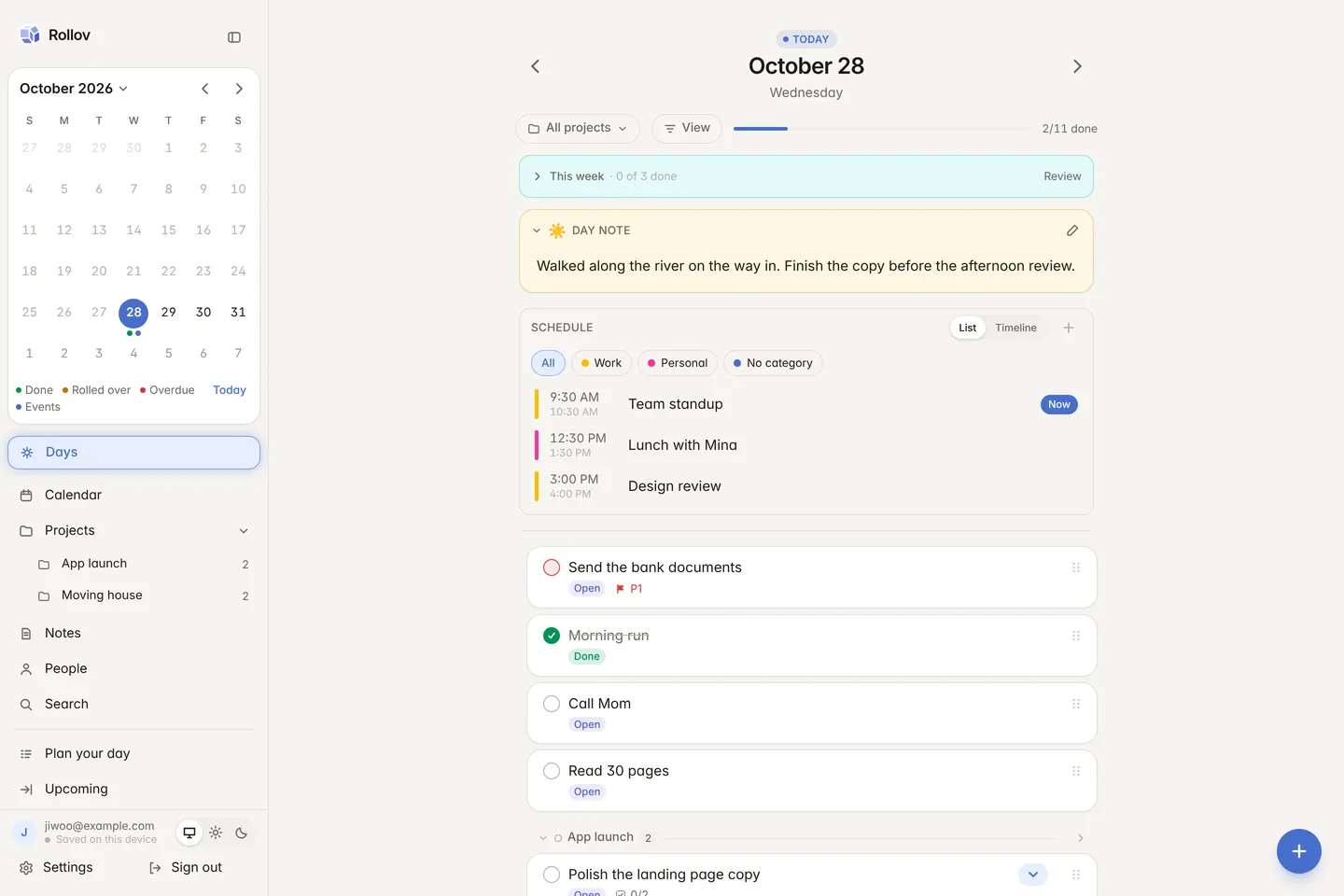
Your schedule, your tasks, this week's goals and a note about the day, on one page. Nothing from next month, nothing from the someday pile.

Rollov's day page: the week's goals, a day note, a schedule split into work and personal, and today's tasks The day page in dark mode
The day page on a phone The day page on a phone in dark mode

Why Rollov

No more wall of red "overdue".

Most task apps are one endless list. Whatever slipped turns red, and what you actually did yesterday disappears. Rollov thinks in days.

A typical task app

  • One list that only grows
  • More "overdue" every morning
  • Moving yesterday's leftovers by hand
  • Finished tasks vanish without a trace
  • Tasks, calendar, notes and people in separate apps

Rollov

  • A small, fresh page every day
  • Unfinished tasks move to tomorrow on their own
  • Tasks that linger get a gentle "keep or drop?"
  • Every past day kept exactly as it was
  • Tasks, events, notes and people linked together

Features

Everything you need to plan the day.

At midnight, the page turns.

What you finished stays on today's page; what you didn't moves to the new one. It happens on the server, so even if your phone was off, tomorrow is ready when you open it.

  • A time machine Flip back to any date and see it as the day ended.
  • Per section Decide which sections roll over and which end with the day.
  • Plan the day, wrap it up Sort what rolled over in the morning, decide what's left in the evening.
  • Nudges for old tasks After a week on the list, a task asks whether to keep going.
Today's tasks on the day page Today's page in dark mode

Schedule, projects and weekly goals, together.

This week's goals sit at the top of every day, today's events below them, and your tasks grouped by project so the day reads at a glance.

  • Event categories Colour-code work and personal, and show only what you need.
  • List or timeline Drag a task onto the timeline to block out time for it.
  • Google Calendar and .ics Events from the calendars you already use, in the same place.
  • Day notes A few lines about the day, collected by date in your notes.
The day page on a phone: weekly goals, a day note and the schedule The day page on a phone in dark mode

Big things become projects.

Give a project sections and subtasks, and watch its progress and weekly completions. Bring just today's part onto today's page.

  • Subtasks They take their parent's dates and priority.
  • Due and focus dates When it has to be done, and when you mean to do it.
  • Templates Stamp out a recurring project or checklist in one go.
  • Move from Todoist Import Todoist CSV exports and Markdown checklists as they are.
A project page with its progress chart and subtasks A project page in dark mode

Notes that connect.

File notes in folders and tag them, then link notes, tasks, projects and days with [[Title]]. Day notes and weekly goals find their own place.

  • Links and backlinks See at once what points to a note.
  • A graph See your links, and replay how they grew with a slider.
  • Every version kept Bring back a sentence you deleted last week.
  • Import files Drop in Markdown, HTML or text files and they become notes.
The notes page with folders, tags, a day note and weekly goals The notes page in dark mode

A planner that remembers people.

Park the things you want to ask someone on their page. They stay off today's list and are right there the next time you meet.

  • Ask next time Tick questions off as you talk; the rest wait for next time.
  • @mentions Mention someone in a note or task and it shows on their page.
  • Birthdays and big days Afterwards, Rollov reminds you to ask how it went.
  • Keep in touch Set a rhythm and see who you are drifting from.
  • Import contacts From your phone, vCard, or Google and Outlook CSV.
A person's page with two questions for next time A person's page in dark mode

Your days add up.

Every day you plan becomes a calendar and insights, a diary you never had to write, with numbers that show where work gets stuck.

  • Calendar Dots for done, rolled over and overdue each day; a year as a heatmap.
  • Weekly review What got done, what rolled over, and done per project.
  • Habits Streaks and the last 30 days for every repeating task.
  • Insights Roll-over rate by week, average done per weekday, what has waited longest.

Privacy and security

Your days are yours.

A planner holds your work, your health and the people in your life. Rollov was built for personal records from the start.

  • App lock A PIN, password or pattern, plus your phone's fingerprint or face.
  • Lock just what you want The whole app, a page like Notes, or a single task.
  • End-to-end encryption Turn it on and your content is sealed on your device, unreadable on the server. Rollover and reminders keep working.
  • Offline first Everything lives on your device and syncs when there's a connection.
  • No ads No advertising or tracking cookies. AI features can be turned off, and Rollov stores nothing they send.

And more

The small things, taken care of.

AI morning brief

A short read on today's tasks and events, written for you each morning.

Add in plain language

"Report by Friday, urgent" fills in the date and priority for you.

Ask your history

"How often did I run last month?" answered from your own days.

Date, time and length pickers

Made for the app: quick dates, a clear time grid and event lengths in a tap.

Repeats and habits

Every few days, chosen weekdays, monthly, or days after the last one. Repeats become habits.

Focus timer

Estimate your tasks and see when a day holds more than you have time for.

Reminders

A reminder time on any task, and a daily count of what's on today.

Search everything

Tasks, notes and projects, offline, earlier versions included.

Undo and trash

Deleted something by mistake? Undo it, or bring it back from the trash.

Dark mode

Follows your system or your choice, easy on the eyes at night.

Export any time

Everything as JSON or Markdown. Your record belongs to you.

Korean and English

Native in both, following your device or your choice in Settings.

Everywhere

On your phone and your computer.

Web

Right at my.rollov.app, with a sidebar and calendar on wide screens. Install it to open offline and share tasks into it from other apps.

Android app

Fingerprint and face unlock, your phone's contacts and calendars, and push reminders.

Sync that waits for you

Saved on the device first, synced when you're back online. Nothing written on the subway gets lost.

FAQ

Questions, answered.

Is it free?

Rollov is in early access, and every feature is free for now, with no card needed. If paid plans come, you'll hear about them first.

What exactly happens at midnight?

At midnight where you are (or the day-start hour you set) a new page opens. Unfinished tasks move to it, and the old page is kept as it was. The server does it, so it happens even while your phone is off.

Does it work offline?

Yes. Everything is kept on your device, so Rollov works the same offline and syncs with your other devices once you're back.

Is my data safe?

Turn on end-to-end encryption in Settings and the text of your tasks and notes is sealed on your device, so not even the server can read it. App lock hides it on screen too. The privacy policy has the details.

What does the AI do with my data?

Quick add, the morning brief and Ask your history each have their own switch. Each sends only what it needs, Rollov stores none of it, and it is not used to train AI models. On encrypted accounts they start switched off.

Can I bring my stuff from another app?

Yes: Todoist CSV exports, Markdown files, contacts (vCard, Google or Outlook CSV) and calendar .ics files. Google Calendar connects directly.

Can I use it on my phone?

Yes. There's an Android app, and on any phone you can add my.rollov.app to your home screen and use it like an app. One account syncs everywhere.

What if I want to leave?

Settings exports everything as JSON or Markdown, and you can delete your account at any time.

Tomorrow starts clean.

Your first page is waiting. It takes ten seconds to start.

Create your account

Free during early access · No card needed